# What does a 100 KB or 1 MB cap do to a PDF? We tested text, photos and scans (Nov 2026)
> Four PDFs compressed with Ghostscript to 100,000 and 1,000,000 byte caps. Tables, charts, method and a downloadable dataset, measured 27 Nov 2026.
URL: https://tools.cuelark.com/guides/pdf-quality-at-size-caps
Author: Cuelark Team
Published: 2026-11-27
Updated: 2026-11-27
Tool: [Compress PDF to 100 KB](https://tools.cuelark.com/compress-pdf-to-100kb)
*By the Cuelark Team. Measured on 27 November 2026, between 08:44:42 and 09:09:39 AM IST (Asia/Calcutta). Disclosure: we make Cuelark Tools, including a [browser-based PDF compressor that aims at a 100 KB cap](https://tools.cuelark.com/compress-pdf-to-100kb). This study measures Ghostscript on the command line, not our website and not other online tools. Every number comes from the run described below.*
Job portals, university forms and many mail systems still ask for a PDF under 100 KB, 200 KB, 500 KB or 1 MB. Those caps are easy to state and hard to meet once a file contains photographs or a scan. The usual advice is to pick a Ghostscript preset — `/screen` for “screen quality,” `/ebook` for a smaller reading file, `/printer` if you still need print. We wanted a measured answer to a tighter question: at a fixed byte budget, what happens to page quality, and does that depend on whether the PDF is text, photographs, a mix, or a scan?
We built four A4 PDFs and compressed each one with three Ghostscript distiller presets and with a size-aware search aimed at 100,000, 200,000, 500,000 and 1,000,000 bytes. Quality was scored with SSIM (structural similarity) on 150 DPI page rasters. We also checked whether `pdftotext` could still read the same words after compression.
This page is the citable dataset for that run: the tables, the charts, the method, and a download of every measurement.
**Download the dataset:** [results.csv](https://tools.cuelark.com/data/pdf-quality-at-size-caps/results.csv) (every fixture, preset, grid cell and cap pick), [results.json](https://tools.cuelark.com/data/pdf-quality-at-size-caps/results.json) (the same run as JSON), [per-page SSIM](https://tools.cuelark.com/data/pdf-quality-at-size-caps/per-page-ssim.csv) (photo and mixed pages, labelled photo or text), [encoder versions](https://tools.cuelark.com/data/pdf-quality-at-size-caps/versions.txt), [metric notes](https://tools.cuelark.com/data/pdf-quality-at-size-caps/NOTES.txt), [fixture manifest](https://tools.cuelark.com/data/pdf-quality-at-size-caps/manifest.json), [photograph sources](https://tools.cuelark.com/data/pdf-quality-at-size-caps/sources.json), [text.pdf](https://tools.cuelark.com/data/pdf-quality-at-size-caps/text.pdf) (the 12-page text fixture), or [all of those files as a zip](https://tools.cuelark.com/data/pdf-quality-at-size-caps/pdf-quality-at-size-caps-dataset.zip). Bytes in the files are exact. SSIM in the tables below is rounded to three decimals, as in the original write-up.
## The short answer
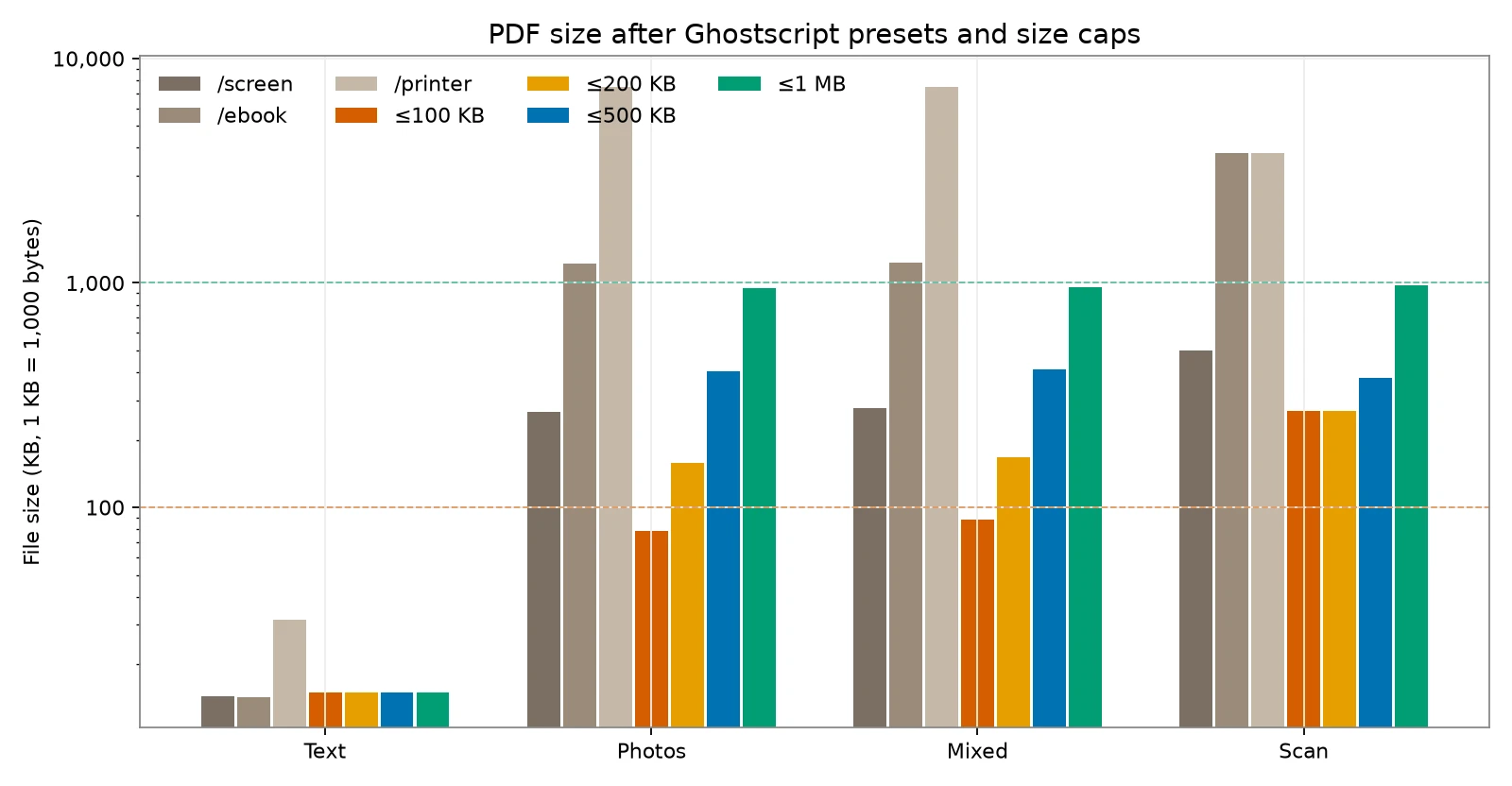
Compressed size for each fixture and method. The axis is logarithmic. Dashed lines mark 100 KB and 1 MB. Methods that miss a cap are still plotted at their real size.
- **A text-only PDF was already under every cap we tested.** Our 12-page text file was 14,958 bytes. Copying it beat compressing it: `/printer` actually made it larger (31,550 bytes). Every preset kept selectable text and a mean SSIM of 0.993 (worst page 0.976).
- **On a photo PDF, a size-aware 100 KB pick beat Ghostscript `/screen` on both size and worst-page quality.** The 100,000-byte search produced a 78,881-byte file with mean SSIM 0.909 and worst-page SSIM 0.872. `/screen` was 266,395 bytes — over the 100 KB and 200 KB caps — with a worse worst-page SSIM of 0.838.
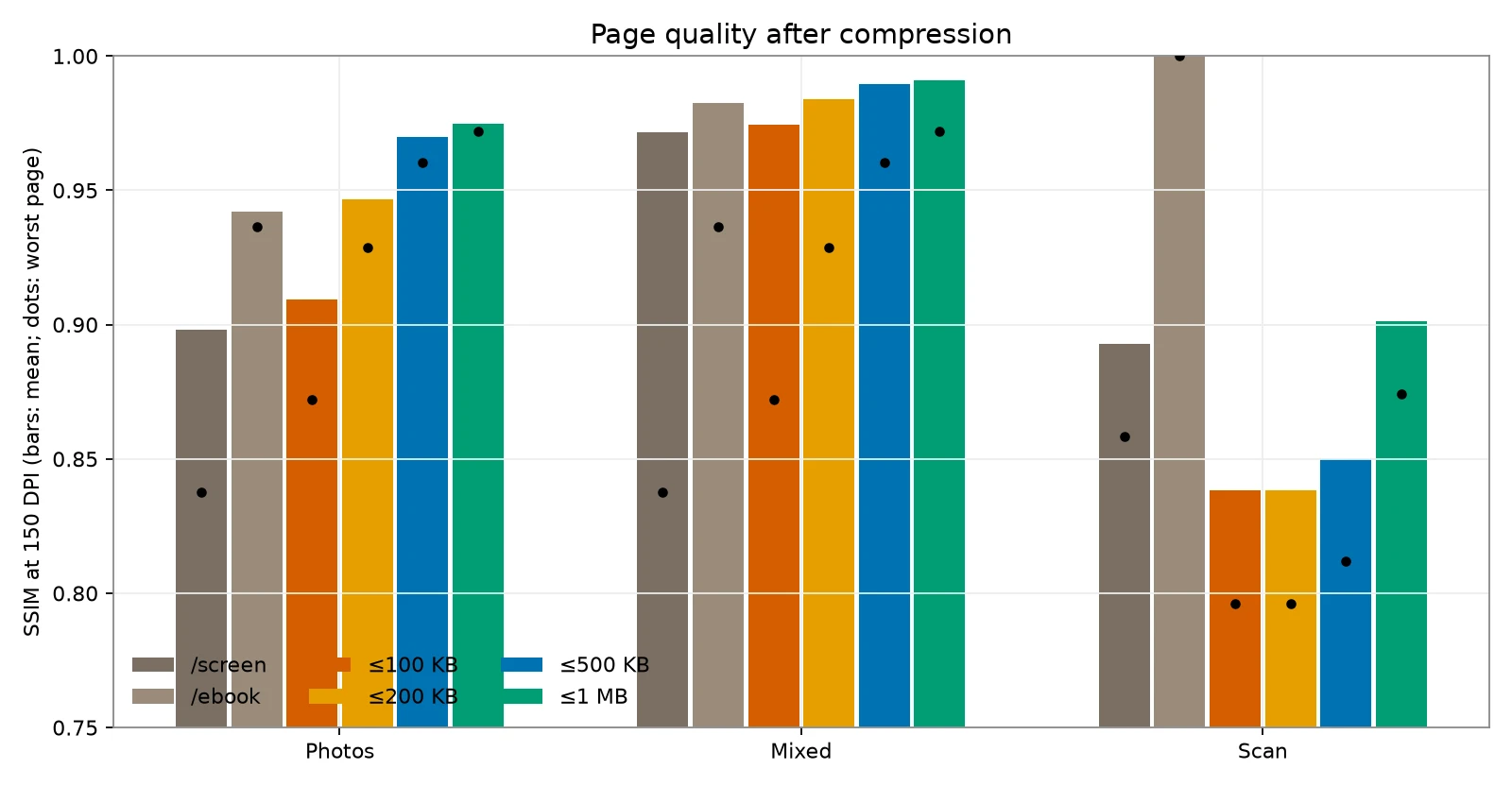
- **Mean SSIM on a mixed file hides the photo pages.** At the 100 KB cap our mixed text-and-photo PDF scored a mean SSIM of 0.974, but the two photo pages scored 0.947 and 0.872 (mean 0.909) — the same, to three decimals, as the photos-only file. The six text pages stayed at 0.996 mean (worst 0.977). If you only look at the document average, you will think the photographs survived better than they did.
- **A 200 DPI image-only scan would not fit in 100 KB or 200 KB.** The smallest file in our grid was 268,921 bytes, with mean SSIM 0.838 and worst-page SSIM 0.796. `/screen` fitted a 500 KB cap (502,083 bytes, mean SSIM 0.893) but not a 200 KB cap. `/ebook` and `/printer` barely recompressed the already-JPEG pages and stayed near 3.8 MB with SSIM 1.000.
In this article, 1 KB is 1,000 bytes and 1 MB is 1,000,000 bytes. SSIM is reported to three decimals. 1.000 means the 150 DPI rasters are identical.
## What we compressed
| Fixture | Pages | Source size | Words (`pdftotext`) | What it is |
|---|---|---|---|---|
| Text | 12 | 14,958 B | 1,902 | Selectable text, no photographs |
| Photos | 4 | 18,408,857 B | 62 | Two CC BY-SA 4.0 photographs, each used twice, plus short captions |
| Mixed | 8 | 18,421,507 B | 3,016 | Text pages plus the same two photographs on pages 3 and 6 |
| Scan | 8 | 4,717,826 B | 0 | Image-only 200 DPI JPEGs of the mixed file, no text layer |
The photographs are Frank Schulenburg’s Golden Gate Bridge picture and Elena.laps’ tulips at Keukenhof, both [CC BY-SA 4.0](https://creativecommons.org/licenses/by-sa/4.0/). They are the same source files as in our 25 November 2026 [100 KB image-quality study](https://tools.cuelark.com/guides/image-quality-at-100kb). Hashes and links are in [sources.json](https://tools.cuelark.com/data/pdf-quality-at-size-caps/sources.json). reportlab wraps JPEGs as ASCII85+DCT, so the photo and mixed PDFs are larger than the JPEGs alone; the sizes above are the PDF sources we actually compressed. If a scan starts life as a TIFF, converting it with a [TIFF to PDF tool](https://tools.cuelark.com/tiff-to-pdf) is a different step from the size-cap question below.
## Quality after compression
Mean SSIM at 150 DPI for each fixture and method. The dot on each bar is the worst page. Higher is better.
### Ghostscript presets
| Fixture | `/screen` | `/ebook` | `/printer` |
|---|---|---|---|
| Text | 14,388 B, SSIM 0.993 (min 0.976) | 14,288 B, SSIM 0.993 (min 0.976) | 31,550 B, SSIM 0.993 (min 0.976) |
| Photos | 266,395 B, SSIM 0.898 (min 0.838) | 1,218,451 B, SSIM 0.942 (min 0.936) | 7,480,073 B, SSIM 0.979 (min 0.959) |
| Mixed | 276,055 B, SSIM 0.972 (min 0.838) | 1,228,073 B, SSIM 0.983 (min 0.936) | 7,498,607 B, SSIM 0.992 (min 0.959) |
| Scan | 502,083 B, SSIM 0.893 (min 0.858) | 3,775,981 B, SSIM 1.000 (min 1.000) | 3,779,207 B, SSIM 1.000 (min 1.000) |
`/screen` is the only preset that gets the photo PDF near a form-upload budget, and it still misses 100 KB and 200 KB. `/ebook` on the photo file is already over 1 MB (1,218,451 bytes). `/printer` on the text file is *larger* than the source, because the distiller rewrote a small, already-efficient file.
### Size-aware caps
For each cap we ran a grid of Ghostscript colour-image resolutions (300, 200, 150, 100, 72 DPI) and JPEG `QFactor` values (0.15, 0.30, 0.50, 1.00, 1.50, 2.00; a smaller `QFactor` is higher JPEG quality). We kept the candidate that fitted the cap with the highest mean SSIM, breaking ties in favour of the larger file. If nothing fitted, we copied the smallest grid file and marked the cap as a miss.
| Fixture | ≤100 KB | ≤200 KB | ≤500 KB | ≤1 MB |
|---|---|---|---|---|
| Text | 14,958 B (copy), SSIM 1.000 | same copy | same copy | same copy |
| Photos | 78,881 B, SSIM 0.909 (min 0.872) | 158,055 B, SSIM 0.947 (min 0.929) | 403,016 B, SSIM 0.970 (min 0.960) | 947,600 B, SSIM 0.975 (min 0.972) |
| Mixed | 88,539 B, SSIM 0.974 (min 0.872) | 167,713 B, SSIM 0.984 (min 0.929) | 412,674 B, SSIM 0.990 (min 0.960) | 957,258 B, SSIM 0.991 (min 0.972) |
| Scan | **did not fit** (268,921 B, SSIM 0.838, min 0.796) | **did not fit** (same 268,921 B file) | 376,781 B, SSIM 0.850 (min 0.812) | 972,115 B, SSIM 0.901 (min 0.874) |
The photo 100 KB file came from grid settings `r100` and `QFactor` 1.50. The 1 MB photo file came from `r200` and `QFactor` 0.15. The scan’s smallest grid file was `r72` and `QFactor` 2.00 — the roughest cell in the grid — and it was still 268,921 bytes. The scan file that fitted 500 KB came from `r72` and `QFactor` 1.00; the 1 MB scan file came from `r100` and `QFactor` 0.50.
Word counts survived on every text, photo and mixed method in the tables: 1,902/1,902, 62/62 and 3,016/3,016. The scan has no text layer, so there was nothing for `pdftotext` to recover (both counts were zero). If you need words from a scan, you need OCR, not a more generous JPEG `QFactor`. [Cuelark’s PDF-to-text tool](https://tools.cuelark.com/pdf-to-text) extracts already-selectable text; it will not invent a text layer on a scan like this one.
## Mean scores hide the photo pages
The mixed 100 KB row looks excellent if you only read the mean: 0.974. Split by page type, it is a different file. The six text pages have mean SSIM 0.996 (worst 0.977). The two photo pages have mean SSIM 0.909 and worst-page SSIM 0.872 — the same, to three decimals, as the photos-only file at the same settings. The 1 MB mixed file shows the same pattern: overall mean 0.991, photo-page mean 0.975 (min 0.972).
That is why we published [per-page scores](https://tools.cuelark.com/data/pdf-quality-at-size-caps/per-page-ssim.csv). A mixed “average quality” figure is mostly a count of how many text pages you have.
## What the photographs look like
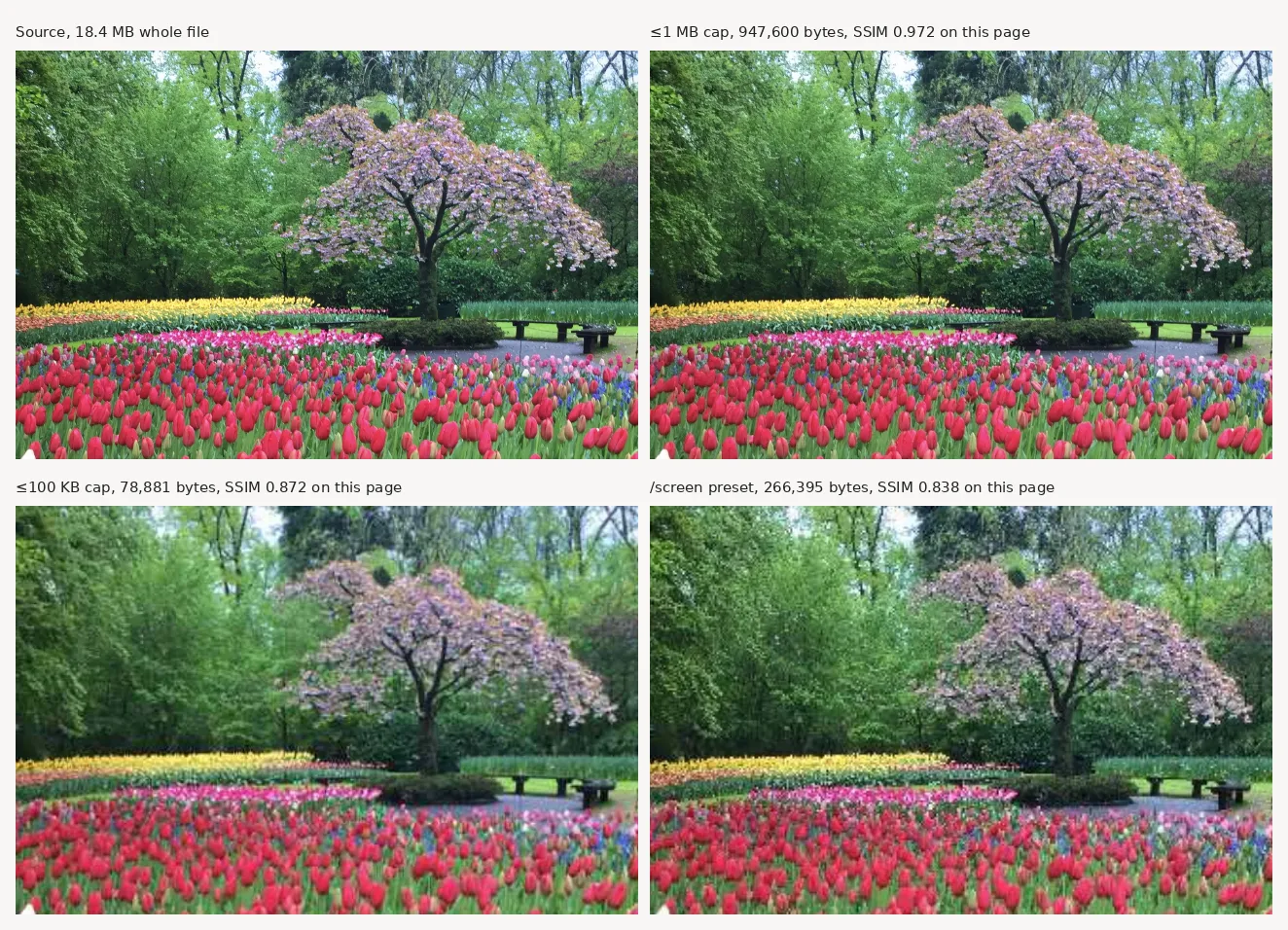
The crops below are from page 2 of the photos fixture, Elena.laps’ tulips at Keukenhof ([CC BY-SA 4.0](https://creativecommons.org/licenses/by-sa/4.0/)). The two tulip pages were consistently the weaker pages; the Golden Gate pages held up better. At the 100 KB cap, the bridge pages scored SSIM 0.947 and the tulip pages scored 0.872.
Tulip photo, page 2 of the photos fixture, left to right: the source PDF; the ≤1 MB pick (947,600 B, this page SSIM 0.972); the ≤100 KB pick (78,881 B, this page SSIM 0.872); and Ghostscript /screen (266,395 B, this page SSIM 0.838). Photograph by Elena.laps, CC BY-SA 4.0.
The 1 MB cap is close to the source at a normal reading size. The 100 KB cap is softer and flatter, but it is still a clearer crop than `/screen`, and it is less than a third of `/screen`’s size. `/screen` is the wrong default if the cap is 100 KB: it misses the cap and damages the hardest page more than a search that is aimed at the cap.
The 100 KB photo file is 233.4 times smaller than the 18,408,857-byte source (18,408,857 ÷ 78,881). That is a real saving. It is also a real quality loss. We would not call SSIM 0.872 “visually lossless.”
## Method
We measured this on 27 November 2026, from 08:44:42 to 09:09:39 AM IST (Asia/Calcutta), on one Linux machine.
- **Encoder:** Ghostscript 10.05.1 (GPL), `pdfwrite` device. Presets were `-dPDFSETTINGS=/screen`, `/ebook` and `/printer`. The size-cap grid set `ColorImageResolution` and Distiller `QFactor` through `setdistillerparams`. (The `JPEGQ` switch is not accepted by this Ghostscript build.)
- **Caps:** 100,000, 200,000, 500,000 and 1,000,000 bytes. For each cap, every grid file at or under the cap was a candidate. We chose the highest mean SSIM, then the largest file if two means tied. If nothing fitted, we copied the smallest grid file and recorded `fits=false`.
- **Viewing size:** each page of the source and of the compressed file was rasterised with Poppler 25.03.0 `pdftoppm` at 150 DPI. Pages were forced to the same pixel size, then compared with ImageMagick 7.1.1-43 `magick compare` for SSIM and PSNR. We report mean SSIM across pages and the worst page.
- **Text survival:** `pdftotext` word counts on the source and on the compressed file. We counted a file as having survived if the ratio was at least 0.95, or if both counts were zero.
- **Fixtures:** built with reportlab 5.1.0. The scan is a 200 DPI JPEG image of each mixed page, wrapped as a PDF with pikepdf 10.17.0, with no text layer.
PSNR is in the raw CSV, but it is not the headline metric. On this ImageMagick build, two identical rasters print `0 (0)` rather than `inf`, and a Ghostscript rewrite of a text page can show a PSNR around 25 dB even when SSIM is 0.977–1.000, because font rasterisation shifts slightly. SSIM did not have that problem, so we ranked and published on SSIM. The [notes file](https://tools.cuelark.com/data/pdf-quality-at-size-caps/NOTES.txt) in the dataset spells this out.
## Limits of this run
This is one encoder, one grid, four fixtures, one viewing resolution. We did not test other tools, other Ghostscript versions, jbig2 or color-to-gray conversions, or a human rater. A different photograph, a sharper scan, or a cap of 50 KB could change the winner. The scan result is not a claim that “no scan can fit in 200 KB”; it is a claim that *this* 200 DPI, eight-page, colour JPEG scan did not fit in our grid.
We also did not score “will this file be accepted by a particular portal.” Some portals recode what you upload. Some count 1 KB as 1,024 bytes. Our caps are 1,000-byte kilobytes.
The photo and mixed source PDFs are large and rebuildable from the credited photographs with the scripts in the [dataset zip](https://tools.cuelark.com/data/pdf-quality-at-size-caps/pdf-quality-at-size-caps-dataset.zip). The zip ships `text.pdf`, the measurements, and those scripts, not the 18 MB photo files.
---
*Cuelark Tools is a set of browser-based file tools. If you need to aim a PDF at a 100 KB cap in the browser, that tool is [compress-pdf-to-100kb](https://tools.cuelark.com/compress-pdf-to-100kb). This page is about the Ghostscript measurements above, not a benchmark of that page.*